Run Your Full NDIS Internal Audit in 60 Seconds
AuditCore scans your entire operation against all S1–S4 quality indicators, identifies non-conformances, and generates a corrective action plan — before your external auditor walks in.
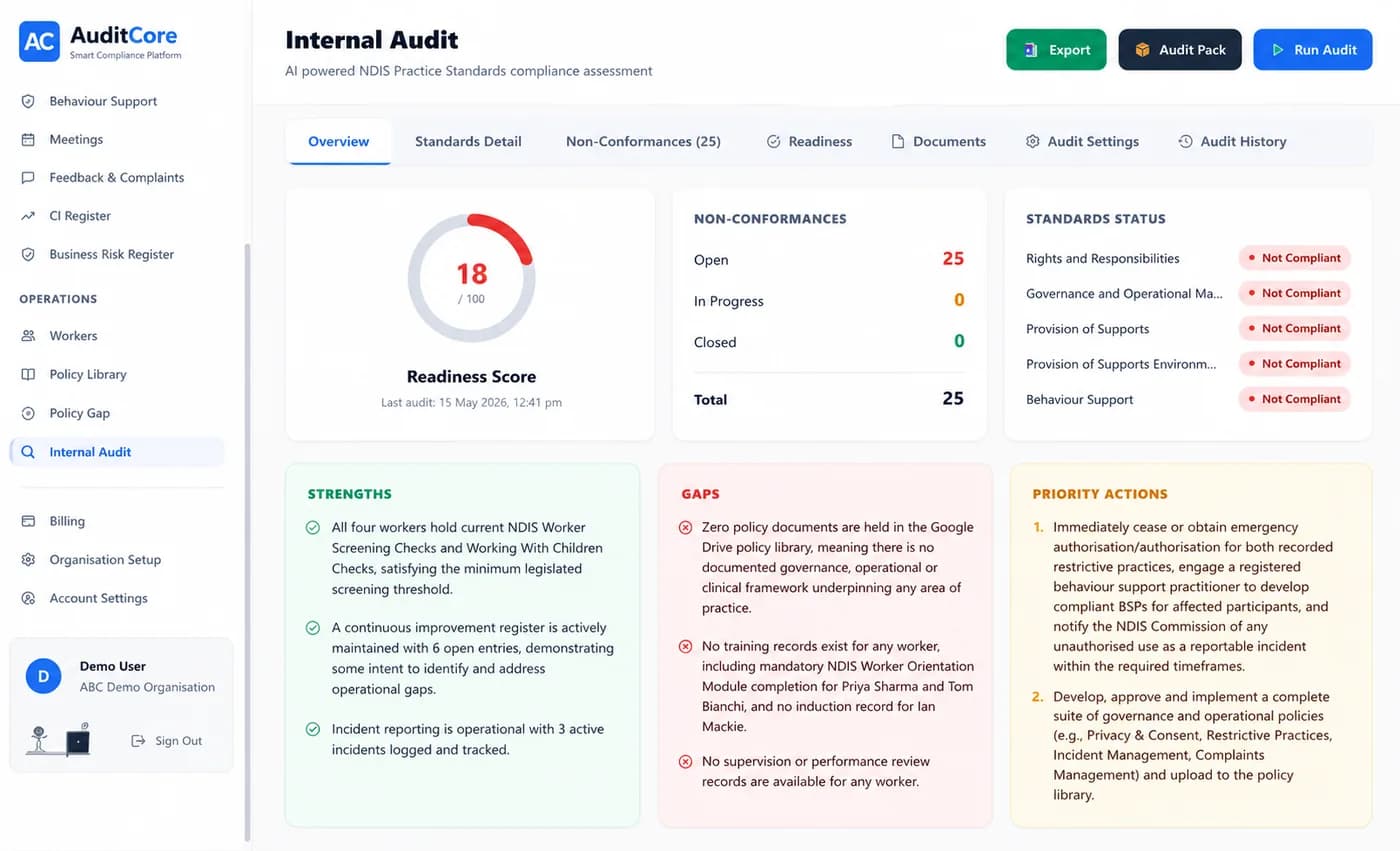
What is Internal Audit AI?
The Internal Audit AI is AuditCore's automated compliance scanner — designed specifically to assess NDIS provider operations against the full S1–S4 quality indicator framework. It reads your live participant records, incident history, and worker compliance data, then maps every data point against all NDIS quality indicators across all four Practice Standards. The result is a scored compliance report — with every indicator rated green, amber, or red — along with specific evidence gaps highlighted and a corrective action plan generated automatically. Unlike a manual checklist audit, AuditCore's AI reads your actual live data, not what you tell it to read. If a participant file is missing a risk assessment, the audit will find it. If a worker's screening check expired last month, the audit will flag it. You get an honest picture of your compliance status — every time you run it.
Why It Matters
NDIS Practice Standard 2 requires registered providers to demonstrate an active internal audit process. Auditors don't just look for a good result on audit day — they want evidence you are auditing yourselves regularly throughout the year. Most providers run internal audits once before their certification audit, using manual checklists that take days to complete. This means compliance problems are discovered too late to fix — or missed entirely. AuditCore compresses the full internal audit cycle into 60 seconds, making monthly audits practical for the first time. Providers who run AuditCore audits monthly arrive at external audit with 12 months of documented internal oversight, corrective actions taken, and measurable improvement — which is exactly what auditors want to see.
How AuditCore Helps
From your AuditCore dashboard, click 'Run Internal Audit.' The AI reads your live data across all modules — participant files, incident records, worker checks and registers. It maps this data against every S1–S4 quality indicator and generates a compliance report in under 60 seconds. The report shows your overall compliance score by standard, flags each non-conformance with the quality indicator reference and evidence gap, and creates a corrective action plan with suggested remediation steps and due dates. Download the report as a PDF for board reporting, or export to Excel for your external auditor as evidence of your internal audit process. Run it monthly — or run it right now to see where you stand.
Everything you need
Related Compliance Guides
Deeper reading on the compliance areas this feature covers
NDIS Quality Indicators: What They Are and How AuditCore Tracks Every One
Quality indicators are the specific checkboxes behind each NDIS Practice Standard. Here is what they mean, how auditors use them, and how AuditCore tracks all of them without manual effort.
NDIS Audit Evidence: What to Prepare for Each Practice Standard
NDIS auditors do not take your word for it — they want evidence. Here is exactly what documentation they check for each Practice Standard, and how AuditCore keeps it all organised and retrievable.
How to Prepare for an NDIS Audit in 30 Days (Week-by-Week Guide)
Thirty days out from your NDIS audit is when most providers panic. Here is a structured week-by-week plan — and how AuditCore runs the equivalent of this entire checklist automatically.
What Happens If You Fail an NDIS Audit? Non-Conformances Explained
A non-conformance is not the end of your registration — but it starts a clock you cannot afford to miss. Here is exactly what happens after an NDIS audit finding.
Other AuditCore Features
Everything you need to stay audit-ready
Incident Management
Log incidents instantly. AI classifies severity and flags what requires NDIS Commission notification — with a 5-day countdown that starts the moment an incident is recorded.
Participant Management
Store every participant's NDIS plan, risk profile, and support history in one place — and let AuditCore AI generate person-centred support plans from your uploaded documents in seconds.
Behaviour Support
Manage BSPs, track restrictive practices, and automate monthly NDIS Commission reporting — all from one platform. AI analyses every plan for compliance gaps before your auditor does.
Worker Compliance
NDISWC, WWCC, police checks, induction, and training — tracked for every worker with automatic expiry alerts. Know your workforce is compliant before your auditor checks.
Document Generation
Upload your participant data once. AuditCore AI auto-fills support plans, incident reports, handover notes and care plans — download as Word docs or export directly to Google Drive.
CI Register
AuditCore automatically imports incidents, complaints, and internal audit findings into your Continuous Improvement Register — formatted exactly how auditors expect to see it.
Ready to stay audit-ready?
Join 50+ Australian NDIS providers who use AuditCore to manage compliance, eliminate manual work, and pass every audit.
Book Your Free Demo