Your CI Register. Auto-Populated. Always Audit-Ready.
AuditCore automatically imports incidents, complaints, and internal audit findings into your Continuous Improvement Register — formatted exactly how auditors expect to see it.
What is CI Register?
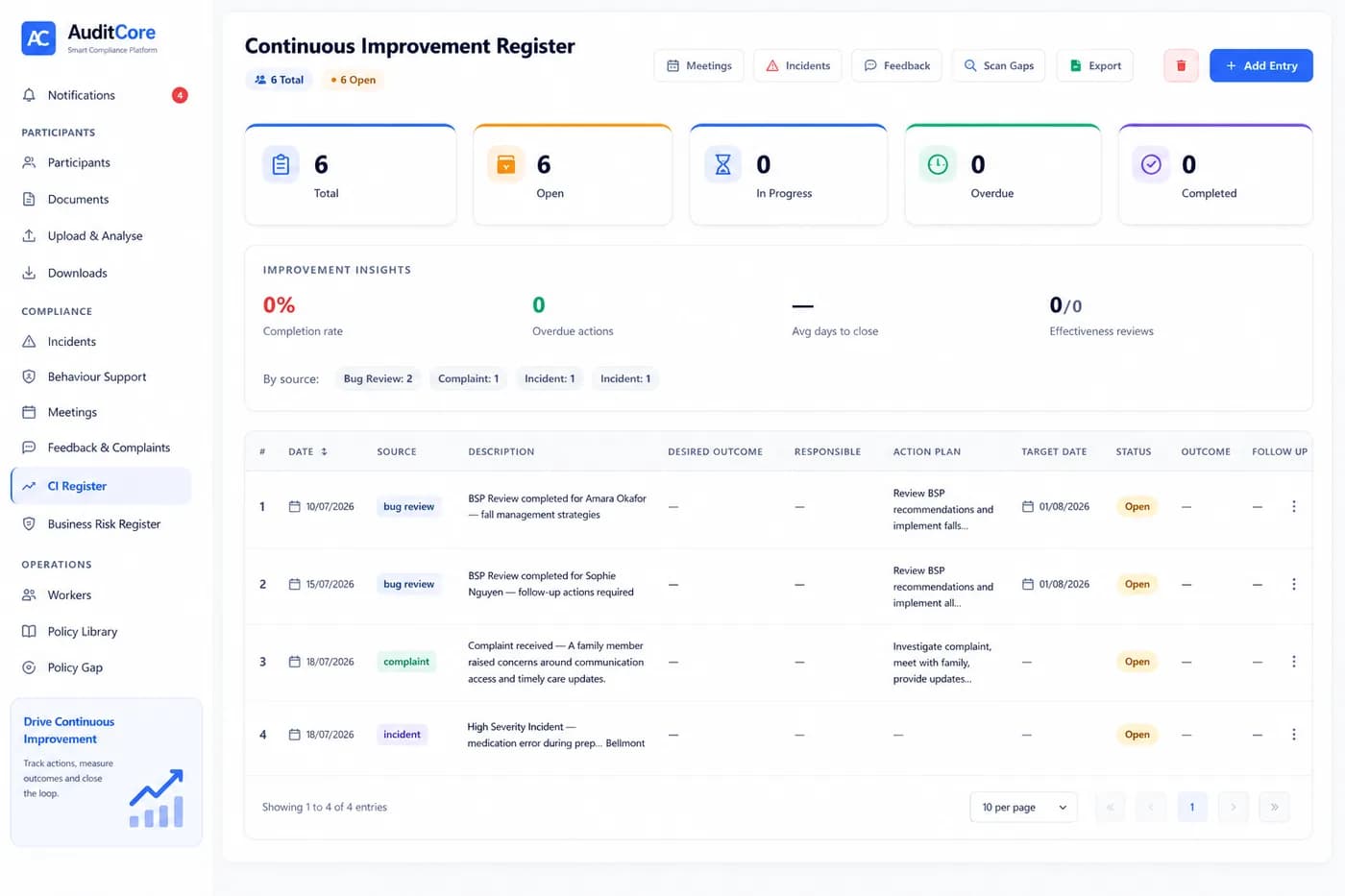
The Continuous Improvement (CI) Register is a mandatory compliance requirement under NDIS Practice Standard 2 (Governance and Operational Management). It records what went wrong, what was learned from it, and what was improved as a result — across incidents, complaints, internal audit findings, and any other source of improvement data. AuditCore auto-populates the CI Register from every source simultaneously: when an incident is closed, a CI entry is created. When a complaint is resolved, a CI entry is created. When an internal audit finds a non-conformance and a corrective action is completed, a CI entry is created. The register is always current, always complete, and always formatted exactly as auditors expect to see it.
Why It Matters
CI Register failures are one of the most consistently cited findings at NDIS certification and re-registration audits. The three most common problems: the register doesn't exist, it exists but hasn't been updated in months, or it exists and is current but doesn't link improvements back to their source (incident, complaint, or audit finding). Auditors want to see a living document that demonstrates your organisation learns from experience and makes systematic improvements. AuditCore's automated population means the register is updated in real time — every closed incident, resolved complaint, and actioned audit finding is instantly reflected. You never arrive at audit with an empty or stale CI Register.
How AuditCore Helps
Every time you close an incident, resolve a complaint, or action a corrective item from an internal audit, AuditCore automatically creates a CI Register entry. The entry is pre-populated with the required fields: date, source (incident/complaint/audit), description of the issue, action taken, responsible person, and outcome. You review and confirm the entry — adding any additional detail about the improvement made. The register is searchable and filterable by date, source, and status. Export to Excel in one click for your board's quarterly governance report or your external auditor's review. Every entry links back to its source record — so auditors can trace the full improvement loop from problem through to resolution.
Everything you need
Related Compliance Guides
Deeper reading on the compliance areas this feature covers
NDIS Corrective Action Plan: What to Include and How AuditCore Generates One Automatically
A corrective action plan is not a punishment — it is your roadmap back to full compliance. Here is exactly what yours needs to include, and how AuditCore creates it from your audit findings automatically.
NDIS Quality Indicators: What They Are and How AuditCore Tracks Every One
Quality indicators are the specific checkboxes behind each NDIS Practice Standard. Here is what they mean, how auditors use them, and how AuditCore tracks all of them without manual effort.
What Happens If You Fail an NDIS Audit? Non-Conformances Explained
A non-conformance is not the end of your registration — but it starts a clock you cannot afford to miss. Here is exactly what happens after an NDIS audit finding.
NDIS Quality and Safeguarding Commission: What Every Registered Provider Must Know
The NDIS Quality and Safeguards Commission is the national regulator for NDIS providers. Understanding what it oversees, how it enforces compliance, and what triggers an audit is essential knowledge for every registered provider.
Other AuditCore Features
Everything you need to stay audit-ready
Internal Audit AI
AuditCore scans your entire operation against all S1–S4 quality indicators, identifies non-conformances, and generates a corrective action plan — before your external auditor walks in.
Incident Management
Log incidents instantly. AI classifies severity and flags what requires NDIS Commission notification — with a 5-day countdown that starts the moment an incident is recorded.
Participant Management
Store every participant's NDIS plan, risk profile, and support history in one place — and let AuditCore AI generate person-centred support plans from your uploaded documents in seconds.
Behaviour Support
Manage BSPs, track restrictive practices, and automate monthly NDIS Commission reporting — all from one platform. AI analyses every plan for compliance gaps before your auditor does.
Worker Compliance
NDISWC, WWCC, police checks, induction, and training — tracked for every worker with automatic expiry alerts. Know your workforce is compliant before your auditor checks.
Document Generation
Upload your participant data once. AuditCore AI auto-fills support plans, incident reports, handover notes and care plans — download as Word docs or export directly to Google Drive.
Ready to stay audit-ready?
Join 50+ Australian NDIS providers who use AuditCore to manage compliance, eliminate manual work, and pass every audit.
Book Your Free Demo