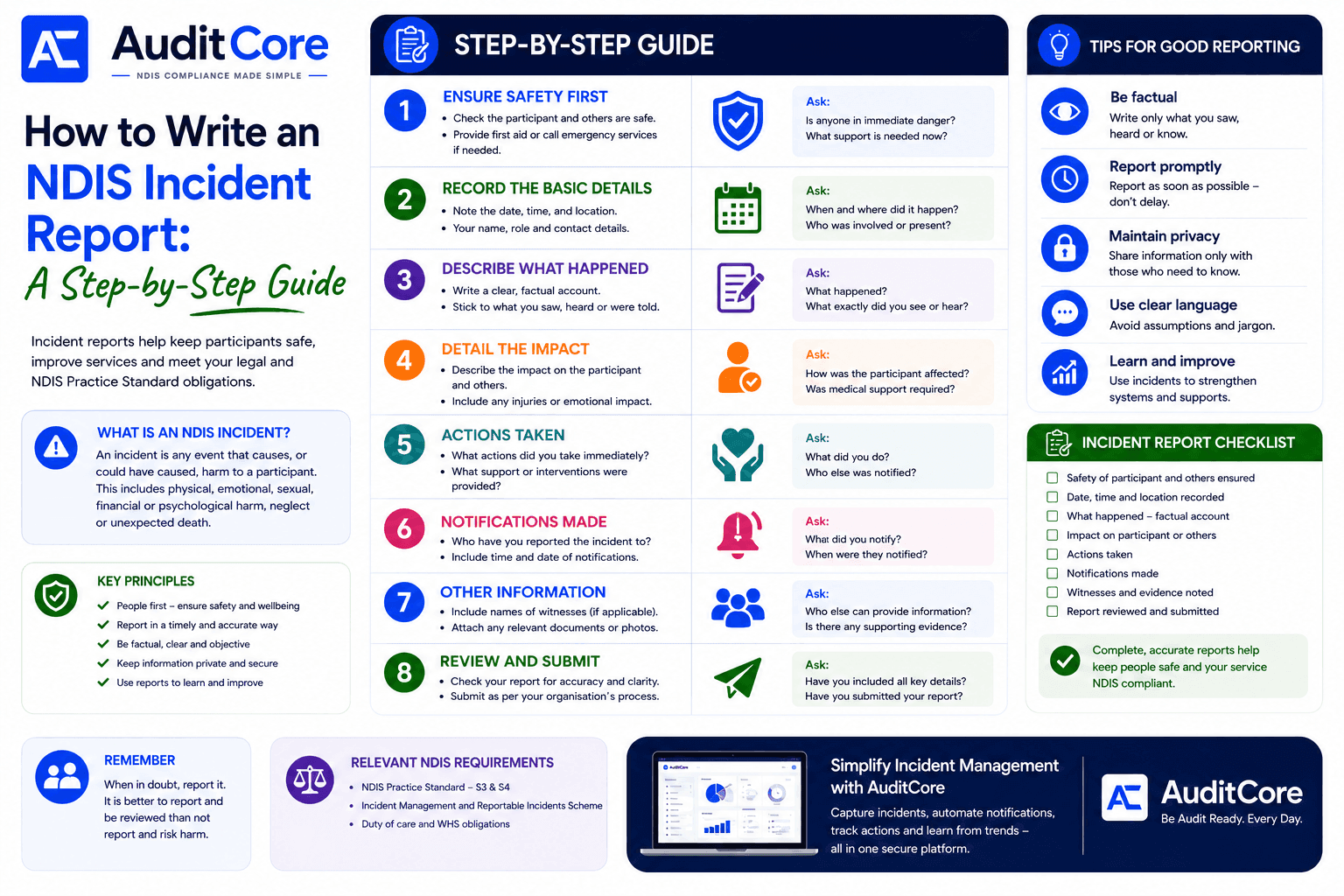
Incident reports help keep participants safe, improve services and meet your legal and NDIS Practice Standard obligations. A well-written report protects your participants, protects your organisation, and demonstrates to the NDIS Commission that you take safety seriously. A poorly written one can be returned for resubmission — eating into your five-business-day notification deadline. AuditCore provides a structured incident form that guides workers through every required field in plain language.
What is an NDIS Incident?
An incident is any event that causes, or could have caused, harm to a participant. This includes physical, emotional, sexual, financial or psychological harm, neglect or unexpected death.
Key Principles of Good Incident Reporting
- People first — ensure the safety and wellbeing of the participant before anything else
- Report in a timely and accurate way — do not delay and do not guess
- Be factual, clear and objective — write what you saw, heard or know
- Keep information private and secure — share only with those who need to know
- Use reports to learn and improve — every incident is an opportunity to strengthen your systems
The 8-Step Incident Report Guide
AuditCore's Incident Management module guides staff through every required field of an NDIS incident report — and automatically checks notification timelines so nothing is missed.
See Incident Management →- 1Ensure Safety First — check the participant and others are safe; provide first aid or call emergency services if needed. Ask: Is anyone in immediate danger? What support is needed now?
- 2Record the Basic Details — note the date, time and location; your name, role and contact details. Ask: When and where did it happen? Who was involved or present?
- 3Describe What Happened — write a clear, factual account; stick to what you saw, heard or were told. Ask: What happened? What exactly did you see or hear?
- 4Detail the Impact — describe the impact on the participant and others; include any injuries or emotional impact. Ask: How was the participant affected? Was medical support required?
- 5Actions Taken — record what actions you took immediately and what support or interventions were provided. Ask: What did you do? Who else was notified?
- 6Notifications Made — record who you reported the incident to, with the time and date of each notification. Ask: Who did you notify? When were they notified?
- 7Other Information — include names of witnesses if applicable; attach any relevant documents or photos. Ask: Who else can provide information? Is there any supporting evidence?
- 8Review and Submit — check your report for accuracy and clarity; submit as per your organisation's process. Ask: Have you included all key details? Have you submitted your report?
Step 1 — Record the Incident Immediately
The first rule of incident reporting is timeliness. Record what you know immediately, even if you do not have all the details yet. AuditCore allows you to create a draft incident record and update it as information becomes available — the timestamp of your first entry demonstrates you acted promptly.
Step 2 — Describe What Happened in Plain Language
Write exactly what happened — not what you think caused it, not your interpretation, just the facts as they occurred. Use specific times, specific locations, and specific actions. Avoid jargon and avoid minimising language.
- Include the date, time, and exact location of the incident
- Name everyone involved — participant, workers present, any witnesses
- Describe what happened in chronological order
- State what the participant's condition was before, during, and after the incident
- Record any immediate actions taken to support the participant
Step 3 — Classify the Incident Correctly
The classification you assign determines whether the incident needs to be reported to the NDIS Commission. AuditCore's AI reads your description and suggests a classification based on the NDIS (Incident Management and Reportable Incidents) Rules. You always have the final say — but the AI catches incidents that workers might classify as internal when they are actually reportable.
Step 4 — Document the Internal Notification Chain
You must document who was notified internally and when. Auditors check this — they want to see that your internal escalation process worked as your policy describes. AuditCore prompts you to record the name and time of each internal notification as part of the incident form.
Step 5 — Notify the Commission if Required
If the incident is reportable, you have five business days from the day the incident comes to the knowledge of your provider. AuditCore calculates this deadline automatically and displays a countdown. The Commission notification is pre-filled from your incident record — you review and submit.
Tips for Good Reporting
- Be factual — write only what you saw, heard or know; do not speculate
- Report promptly — report as soon as possible; do not delay even if details are incomplete
- Maintain privacy — share information only with those who need to know
- Use clear language — avoid assumptions, jargon and technical terms frontline workers may misunderstand
- Learn and improve — use incidents and near misses to strengthen systems and supports
Language That Gets Reports Rejected
- "The participant became agitated" — describe the specific behaviour instead
- "The worker made an error" — describe what specifically happened
- "Normal procedures were followed" — describe the actual procedures used
- "The participant was fine afterwards" — describe their actual condition and any medical review
- "We don't know how it happened" — document what you do know and what investigation you are undertaking
AuditCore can generate a fully formatted NDIS incident report from your structured data in seconds — no manual write-up required.
See Document Generation →Incident Report Checklist
- Safety of participant and others ensured
- Date, time and location recorded
- What happened — clear factual account written
- Impact on participant or others described
- Actions taken documented
- Notifications made and recorded with times
- Witnesses and supporting evidence noted
- Report reviewed and submitted
Relevant NDIS Requirements
- NDIS Practice Standard S3 — Provision of Supports
- NDIS Practice Standard S4 — Support Provision Environment
- Incident Management and Reportable Incidents Scheme
- Duty of care and WHS obligations
Step 6 — Close the Loop
Every incident must be closed in your system — with documentation of the investigation outcome, any corrective actions taken, and any follow-up with the participant. AuditCore tracks open incidents and alerts your compliance manager to any that have not been closed within your organisation's target timeframe. When in doubt, report it. It is better to report and be reviewed than not report and risk harm.